AvalaraAvalaraDeveloperDeveloper
  • Productsdown arrow
      Calculations
      AvaTax
      AvaTax Brazil
      AvaTax for Communications
      AvaTax for Excise
      Avalara Tax Content
      E-invoicing
      Activation Service
      Avalara E-Invoicing and Live Reporting
      Brazil
      Brazil Customer Portal
      Tax Compliance (Brazil)
      Tax Central
      Data Staging
      Returns
      Avalara Managed Returns API
      MyLodgeTax
      Avalara Returns Excise
      VAT Reporting
      Shared service
      Shared Services
      1099 & W-9
      Avalara 1099 & W-9
      Tax registrations and business licenses
      Avalara License Guidance
      Sales Tax Registrations
      Payroll tax registrations
      Avalara license filings
      ECM
      Exemption Certificate Management
      Avalara Cross-Border
      Automated Tariff Code Classification
      Self-Serve Tariff Code Classification
      Managed and Premium Tariff Code Classification
      AvaTax Cross-Border (Estimator + Calculator)
      Avalara Trade Compliance
      Avalara Trade and Tariff Library
  • Learndown arrow
      Integrations guides
      Refactor guides
      Get certified
  • Get starteddown arrow
      AvaTax 90 days free trial
      Playground
      Become a partner
      Build with Avalara using AI
  • Developdown arrow
      APIs
      SDKs
      MCPs
      Agent to Agent (A2A)
      AI use cases
      API versioning
  • Resourcesdown arrow
      Avalara NEXT recordings
      Avalara University
      Knowledge Center
  • Support
MENU
Search Icon

No results found for

Profile
  • Sign In
Sign In
Search Icon

No results found for

  • Productsdown arrow
      Calculations
      AvaTax
      AvaTax Brazil
      AvaTax for Communications
      AvaTax for Excise
      Avalara Tax Content
      E-invoicing
      Activation Service
      Avalara E-Invoicing and Live Reporting
      Brazil
      Brazil Customer Portal
      Tax Compliance (Brazil)
      Tax Central
      Data Staging
      Returns
      Avalara Managed Returns API
      MyLodgeTax
      Avalara Returns Excise
      VAT Reporting
      Shared service
      Shared Services
      1099 & W-9
      Avalara 1099 & W-9
      Tax registrations and business licenses
      Avalara License Guidance
      Sales Tax Registrations
      Payroll tax registrations
      Avalara license filings
      ECM
      Exemption Certificate Management
      Avalara Cross-Border
      Automated Tariff Code Classification
      Self-Serve Tariff Code Classification
      Managed and Premium Tariff Code Classification
      AvaTax Cross-Border (Estimator + Calculator)
      Avalara Trade Compliance
      Avalara Trade and Tariff Library
  • Learndown arrow
      Integrations guides
      Refactor guides
      Get certified
  • Get starteddown arrow
      AvaTax 90 days free trial
      Playground
      Become a partner
      Build with Avalara using AI
  • Developdown arrow
      APIs
      SDKs
      MCPs
      Agent to Agent (A2A)
      AI use cases
      API versioning
  • Resourcesdown arrow
      Avalara NEXT recordings
      Avalara University
      Knowledge Center
  • Support
Profile
  • Sign In
Sign In
Sales (877) 282-5585
Chapter 3 - Commit/Uncommit
  • Previous Chapter
  • Next

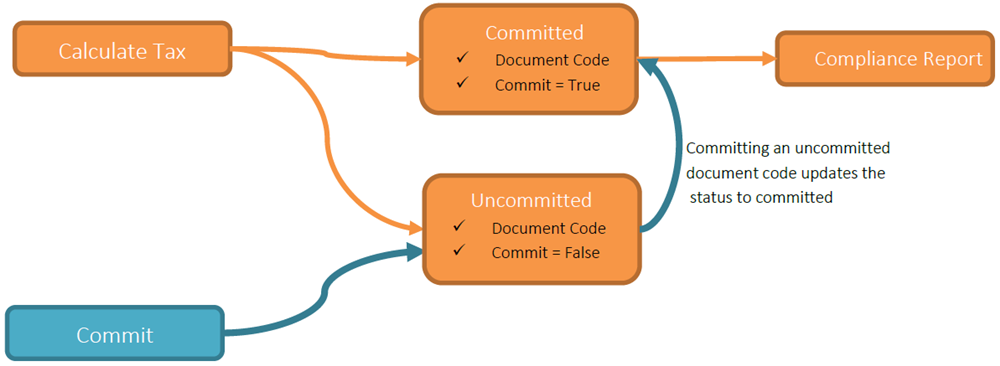
In the Avalara system, transactions (“line items”) can be associated with Document Codes. A Document Code (doc) is a unique identifier. Each Document Code has a status: committed (“true”) or uncommitted (“false”).

You can think of a Document Code’s commit status as a simple flag that determines if a transaction should appear on your compliance reports for remittance to the Department of Revenue at the end of your filing period.
Managing Document Codes in your application is critical to a successful implementation. Good Document Code management also makes the compliance reporting experience significantly easier for your downstream users.

  • The Commit API is often used when not all calculated taxes are deemed final for compliance reporting.
  • When a transaction is deemed final, you can commit the Document Code associated with the transaction(s) via the Commit API.
  • You can commit an entire invoice by committing the Document Code associated with that invoice rather than recalculating the taxes.
  • You do not need to commit or uncommit transactions in real time - you only need to ensure your Document Codes have the correct commit status before reconciliation or report generation begins, usually at the end of a filing period.
  • Committed Document Codes are locked (they cannot be uncommitted) on the 1st day of the subsequent calendar month in which they are sent. For example, if you commit a Document Code on November 15th, that Document Code will be locked on December 1st.
Note

Committing or uncommiting a Document Code affects all transactions associated with that Document Code. It is important to use unique identifiers for Document Codes to give you the flexibility to commit and uncommit specific transaction(s) later.

For example, let’s say you have a bill run that consists of 1,000 invoices, each with 10 line items per invoice, and you use the same Document Code for each invoice. When the bill run is complete, one of your Tax Analysts determines there is an error in one of the invoices. Because the same Document Code was used for each invoice, you cannot simply uncommit the Document Code associated with the bad invoice and remove it from your data set. You must uncommit the entire bill run, or send an adjustment for that specific invoice and send a new, corrected invoice. The Commit API makes it easy to correct mistakes like this.

Commit/Uncommit Process

The Commit API in Communications REST v2 gives your application the ability to choose the data that should appear in your compliance reports. A Document Code’s default commit status is uncommitted (“false”).

To use the Commit API:

  1. Create new transactions at any point in the billing cycle.
  2. Populate the Document Code (doc) with a unique identifier (for example, a randomly generated GUID).
  3. Document Codes can be used to group transactions together between invoices, but be aware of associating too many transactions with a single Document Code. This makes it more difficult to uncommit specific transactions later.
  4. Use the Commit (cmmt) flag to identify transactions to include in or exclude from the compliance report for the reporting cycle.
  5. If you send a Document Code through the CalculateTaxes API as uncommitted, you can only change its commit status through the Commit API; you cannot change a Document Code's status through the CalculateTaxes API.

It’s not necessary to set the Commit flag immediately on a transaction. Use the Commit API to update the Commit flag. See the Use Cases section for implementation examples.

  • Previous Chapter
  • Next
PreviousNext
Knowledge CenterDeveloper Support
Avalara.com|Terms of Use|Privacy Policy
© 2026 Avalara, Inc.