
- Document Workflow
- Calculating Tax
- Address Validation
- Reportable Transactions
- Product Returns
- Exempt Transactions
- Voiding Documents
- Drop Shipping
- Consumer Use Tax
- Batch File Reference
- Automated Provisioning
- SOAP or REST
- Filtering in REST
- Authentication in REST
- Client Profile Headers
- Finding Your CompanyId
- Proxy Server Settings
- Errors and Outages
- REST Error Codes
- SOAP Error Codes
- Service Availability
- Going Live
- Logins and Resources
- About Client Strings
Validate and normalize addresses for sales tax calculation.
Explicit address validations are standalone address validation calls to the ResolveAddress API. This API provides address resolution only, and does not calculate taxes. It returns success if it was able to identify the address and provide information about it; if insufficient information was provided, the API will respond with an error code.
A typical address validation call might provide some incomplete information about an address. In this example below, the street is identified by a partial name, and no postal code is provided.
POST /api/v2/addresses/resolve
{
  "line1": "1000 main",
  "city": "Irvine",
  "region": "CA",
  "country": "US"
}
The result of this API call indicates that Avalara was able to locate the address and identify it correctly as “1000 MAIN ST”, in postal code 92614. The partial result below shows how it was identified as an intersection, and the latitude and longitude could be determined successfully:
{
  "validatedAddresses": [
    {
      "line1": "1000 MAIN ST",
      "line2": "",
      "line3": "",
      "city": "IRVINE",
      "region": "CA",
      "country": "US",
      "postalCode": "92614",
      "latitude": 33.691385,
      "longitude": -117.867524
    }
  ],
  "coordinates": {
    "latitude": 33.691385,
    "longitude": -117.867524
  },
  "resolutionQuality": "Intersection"
}
When invalid information is provided to the address resolution API, you will receive an error message indicating how the data was incomplete. Here’s an example of an undeliverable address that was identified:
POST /api/v2/addresses/resolve
{
  "line1": "123 Main Street",
  "city": "Irvine",
  "region": "CA",
  "country": "US",
  "postalCode": "92615"
}
In the response object, you will receive a list of messages with additional information about the address resolution problem:
{
  "messages": [
    {
      "summary": "The address is not deliverable.",
      "details": "The physical location exists but there are no homes on this street. One reason might be railroad tracks or rivers running alongside this street, as they would prevent construction of homes in this location.",
      "refersTo": "Address",
      "severity": "Error",
      "source": "Avalara.AvaTax.Services.Address"
    }
  ]
}
Address validation is a difficult process, and it is not always possible to identify the address a customer means when they provide partial information. The United States Postal Service provides guidance to developers like Avalara, and we update our address resolution system each month with the best available information. Some common problems that customers experience are:
- New Construction - It can take between 1-6 months for newly constructed houses and buildings to appear in online databases.
- Imprecise Geocoding - Although our database provides latitude and longitude values for addresses, we cannot guarantee a specific level of precision for all addresses. Please check the
resolutionQualityvalue to determine the level of detail in your data. - Incomplete Data - In the United States, best results are obtained when you know the street address and either the postal code or city/state of your address. If you don't have enough information, AvaTax will try its best to provide whatever information can be determined.
An example of partial address resolution is that, when you provide the following address to the ResolveAddress function:
900 winslow way, bainbridge island, 98110
AvaTax will identify this address, validate it, and provide the following detailed result:
{
  "line1": "900 WINSLOW WAY E",
  "line2": "",
  "line3": "",
  "city": "BAINBRIDGE ISLAND",
  "region": "WA",
  "country": "US",
  "postalCode": "98110-2450",
  "latitude": 47.624964,
  "longitude": -122.510325
}
Resolution of Addresses during Tax Calculation
Address Resolution and Transactions both use the same code. When you call /api/v2/transactions/create, the tax calculation engine attempts to resolve the address using the address resolution logic above first. Depending on your user interface, you may want to call /api/v2/addresses/resolve first to help your customer fill out partial data, or you might choose to wait and allow the /api/v2/transactions/create call to perform final address validation.
The address validation logic follows the flow chart below:
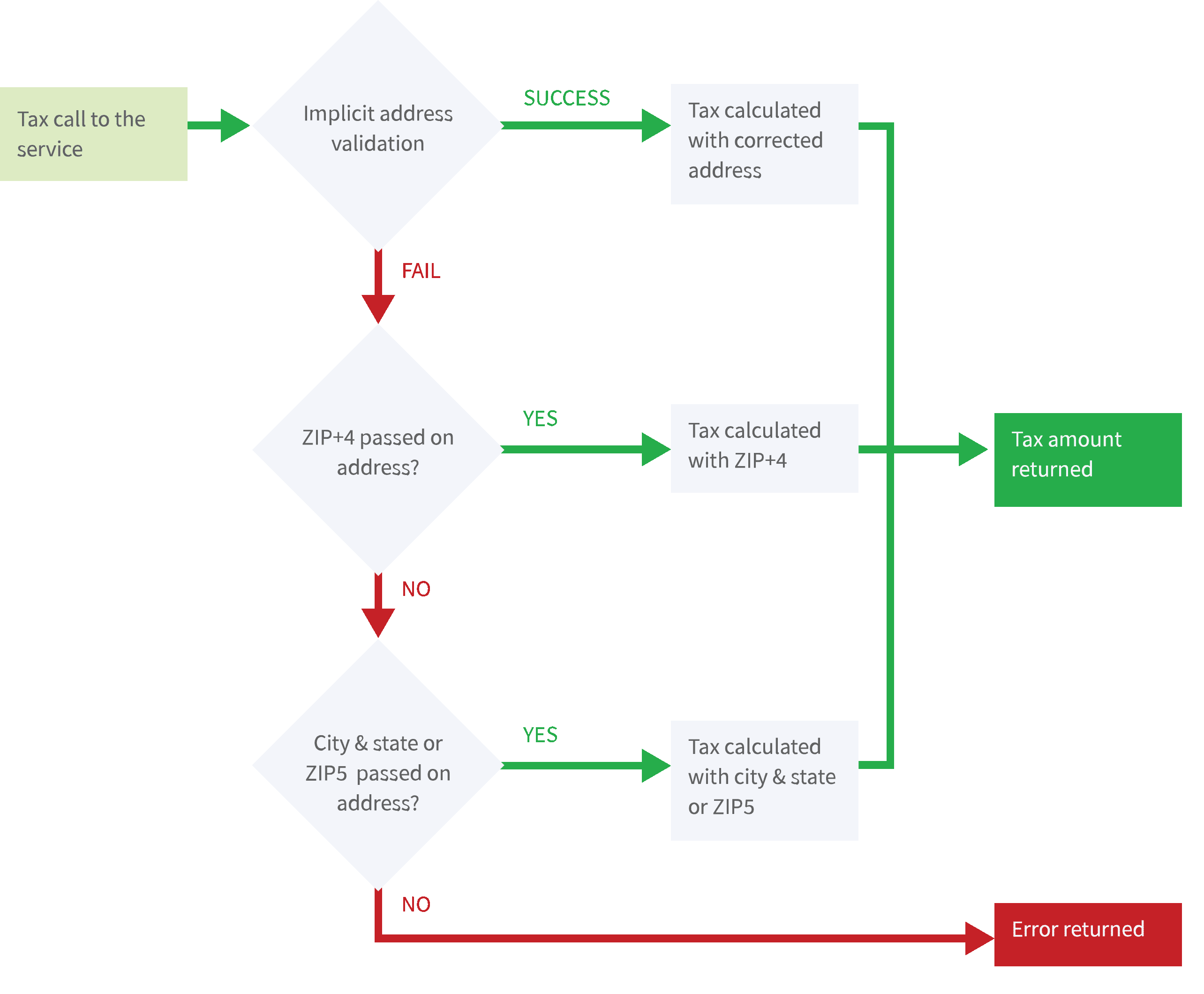
Even in the case that an address cannot be fully resolved, AvaTax will use the best available geocoding information for tax calculation purposes. While a fully validated street address is always better and more accurate, taxing jurisdictions can usually be determined if city, state and zip code are provided.